 ৳0.00
৳0.00 
 0
0

Introduction
In the modern world, the choice between a desktop computer and a laptop has become a significant decision for both personal and professional use. While laptops offer portability, desktops provide a range of advantages that make them an appealing choice for various purposes. This article delves into the reasons why you should choose a desktop over a laptop, exploring the benefits that can greatly enhance your computing experience.
Desktop computers are renowned for their superior performance and power capabilities compared to laptops. With larger cases, they can accommodate more powerful hardware, including advanced processors, graphics cards, and cooling systems. This results in faster processing speeds, smoother multitasking, and the ability to handle resource-intensive tasks with ease. For tasks like video editing, 3D rendering, and gaming, desktops outshine laptops in delivering top-notch performance.
When it comes to ergonomics, desktops offer a distinct advantage. The larger monitors and full-sized keyboards of desktop setups promote a more comfortable working posture, reducing the risk of strain on your eyes, neck, and wrists. You can also adjust the monitor's height and keyboard placement to create an optimal ergonomic setup, which is crucial for long hours of work or gaming.
For gaming enthusiasts, desktops provide an unparalleled gaming experience. High-end gaming desktops can be equipped with cutting-edge graphics cards and high-refresh-rate monitors, resulting in stunning visuals and smooth gameplay. Additionally, desktops allow for better heat management during intense gaming sessions, preventing overheating and ensuring consistent performance.
Desktops excel in offering a wide range of storage options. They can accommodate multiple hard drives, SSDs, and even RAID configurations, providing ample space for storing large files, videos, games, and applications. This flexibility allows users to customize their storage setup according to their needs, ensuring a seamless experience without worrying about running out of space.
Desktops shine when it comes to multitasking capabilities. The powerful hardware and spacious screen real estate enable users to have multiple applications, browsers, and documents open simultaneously without compromising performance. This is especially beneficial for professionals who need to juggle various tasks or for students researching and writing assignments.
In terms of cost-effectiveness, desktops often have an edge over laptops. Desktop components are generally more affordable and easier to replace or upgrade, making it a budget-friendly option in the long run. Instead of replacing an entire laptop, you can simply upgrade a single component to keep up with the latest technology trends.
Desktops offer extensive upgradability, allowing users to replace or upgrade individual components as needed. This means you can extend the lifespan of your computer by simply upgrading the RAM, graphics card, or storage when newer and more powerful options become available. This level of upgradability is not feasible with most laptops, which are often limited by their compact designs.
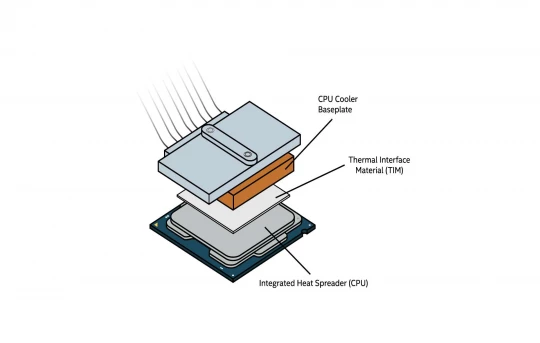
Desktop computers are known for their reliability and durability. They are less prone to overheating issues due to their larger cases and better airflow management. Moreover, their stationary nature reduces the risk of physical damage caused by accidental drops or mishaps. This makes desktops a reliable choice for critical work tasks and long-term use.
Desktops offer a multitude of ports and expansion slots, allowing users to connect a variety of peripherals and devices simultaneously. Whether you need to connect multiple monitors, external storage drives, printers, or specialized input devices, desktops can accommodate these needs without the limitations of laptop connectivity.
Professionals engaged in creative tasks like graphic design, video editing, and music production benefit greatly from desktop setups. The powerful hardware enables these professionals to run resource-intensive software seamlessly, enhancing productivity and creativity. The larger screens also provide a better canvas for detailed work.
Desktops are often considered more secure than laptops due to their stationary nature. They are less likely to be stolen or lost, reducing the risk of sensitive data falling into the wrong hands. Additionally, desktops are easier to secure with physical locks and encryption tools, enhancing privacy and data protection.
From an environmental standpoint, desktops can be more sustainable than laptops. Laptops require more frequent replacements due to their compact designs and limited upgradability, contributing to electronic waste. Desktops, on the other hand, have longer lifespans and generate less e-waste over time.
Desktops offer extensive customization options, allowing users to build a system that matches their preferences and aesthetics. From choosing the case design and LED lighting to selecting components that reflect your style, desktops provide a level of personalization that is not achievable with laptops.
When it comes to maintenance and repairs, desktops have the upper hand. Individual components can be easily accessed and replaced, reducing downtime in case of hardware failures. This contrasts with laptops, where repairs often involve intricate procedures that may require professional assistance.
Q: Can I upgrade a laptop in the same way as a desktop?
A: While some laptops allow limited upgrades like RAM and storage, most components in laptops are soldered or tightly integrated, making extensive upgrades difficult.
Q: Are desktops suitable for business use?
A: Yes, desktops are widely used in businesses for their reliability, performance, and ability to be customized to meet specific business requirements.
Q: Do desktops consume more energy than laptops?
A: Desktops generally consume more energy due to their powerful hardware, but advancements in energy-efficient components have narrowed the gap in recent years.
Q: Can I build my own desktop computer?
A: Yes, building a desktop is a popular option among enthusiasts, as it allows you to choose components based on your needs and preferences.
Q: Are desktops more prone to viruses and malware?
A: While desktops can be targeted by viruses and malware, using reputable security software and practicing safe browsing habits can mitigate these risks.
Q: Do desktops come with Wi-Fi capability?
A: Most modern desktops have built-in Wi-Fi capabilities, but if not, you can easily add Wi-Fi connectivity through USB adapters or internal expansion cards.
Q: Are desktops compatible with touchscreens?
A: While desktops can be equipped with touchscreens, they are not as common as laptops and tablets.
Q: Can desktops be used for virtual reality (VR) gaming?
A: Yes, high-performance desktops are well-suited for virtual reality gaming, as they can handle the demanding graphics requirements of VR
.webp)
2 Comments
BellaSwon
20-10-2025 07:08 PMGood breakdown of why desktops still make sense today. Performance, upgradability, and durability really do give them an edge, especially for gaming or creative work. For those who like combining tech with entertainment, Mostbet is also worth checking out — it runs smoothly on desktop setups and shows how powerful hardware can enhance the overall experience.
Aminul Sujon
13-08-2023 12:06 PMYou really discussed better, helpful article for choosing a desktop over a laptop makes sense if you prioritize performance, customization, and ergonomics, and you don't require the portability that laptops offer. It's important to evaluate your specific needs and how you intend to use your computer before making a decision.